Getting Started Emailing Clients: There are a number of ways to email your clients. There are email templates available for your use.
TABLE OF CONTENTS
- 1. Email from the Client Account
- 2. Email All Clients
- 3. Email Clients from the Schedule
- 4. Other Options
1. Email from the Client Account
Access a Client Account:
- Select "Email."
- Choose Email Template, Add Email Subject, Edit if necessary.
- Select "Update."

2. Email All Clients
Note: To email all your clients from the client search page, firstly connect your email account to your Pet Sitter Plus Software:
- Select the Client Icon.
- Select "Go" to display all clients OR use Filters to select a subset of clients. Select "Reload."
- Select "ALL" checkboxes, or the select clients to Email.
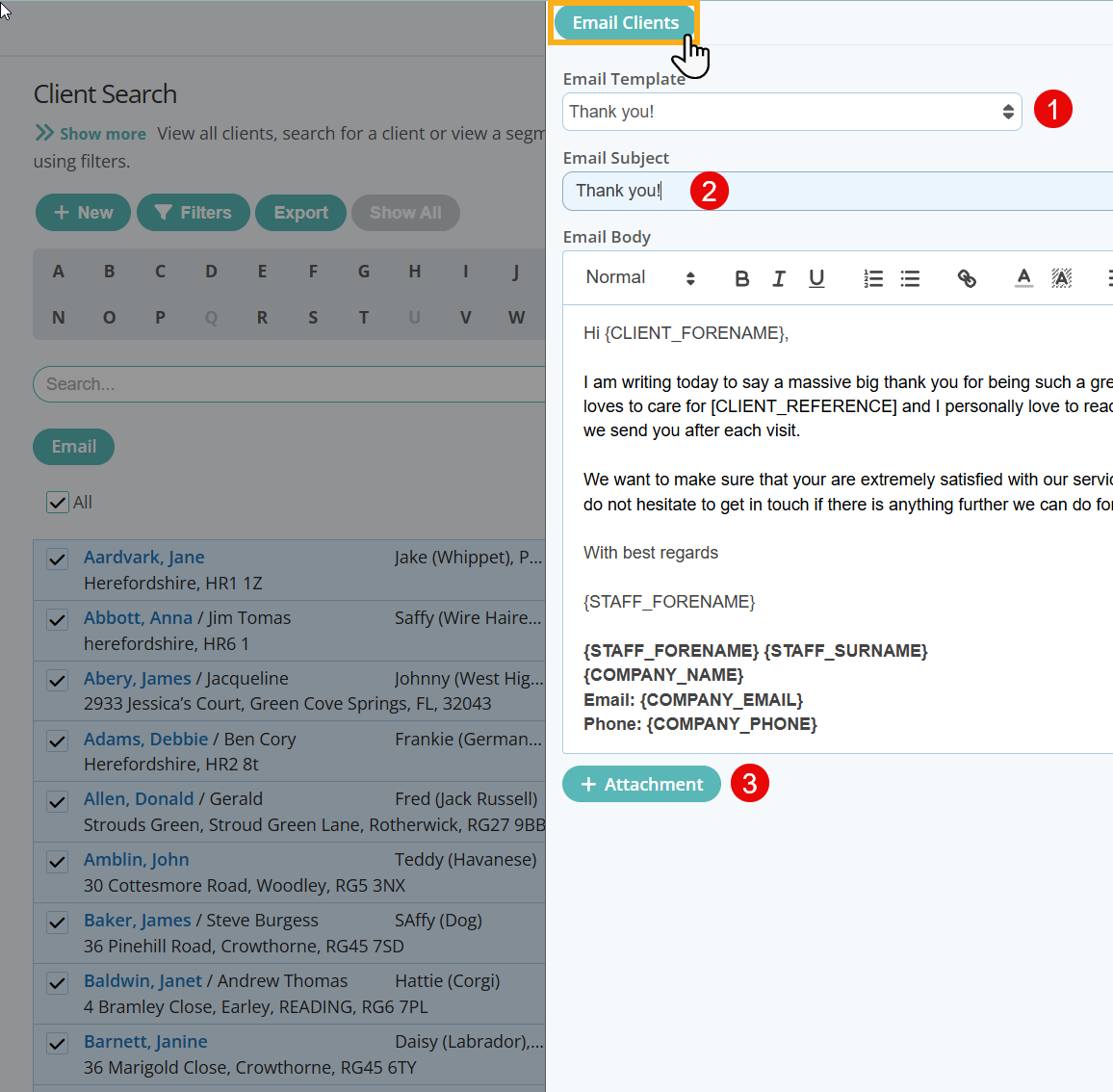
- Select "Email."

- 1. Choose Email Template
- 2. Add Email Subject, Edit if necessary
- 3. Optional: Add an Email Attachment
- Select "Email Clients."
Note: When adding Email Attachments, supported File Types are: .jpeg, .jpg, .png and .pdf. File Size is restricted to 5MB and a maximum of 5 attachments can be sent.
3. Email Clients from the Schedule
- Select the Schedule Icon.
- Use Filters and Dates to select a subset of clients. Select "Reload."
- Select "ALL" checkboxes, or the select clients to Email.
- Select "Email."

- Toggle "Send to Clients ON, to email clients.
- Toggle "Send to Sitters ON, to email Staff.
- Choose Email Template, Add Email Subject, Edit if necessary.
- Optional: Add an Email Attachment.
- Select "Send."
Note: When adding Email Attachments, supported File Types are: .jpeg, .jpg, .png and .pdf. File Size is restricted to 5MB and a maximum of 5 attachments can be sent.

4. Other Options
You can email from these areas of the database as well
Signposts...
Learn more about other client functions:
Was this article helpful?
That’s Great!
Thank you for your feedback
Sorry! We couldn't be helpful
Thank you for your feedback
Feedback sent
We appreciate your effort and will try to fix the article